In my last post, I explained about session management in NodeJS application.
Passport middleware helps to authenticate requests send to NodeJS application via Express. Passport middleware supports for both local and OAuth authentication providers, such as Facebook, Google and Twitter.
This post will continue with the implementations done in my last post. First you need to install passport and passport-facebook middlewares.
Then you need to change your User model.
Four new fields were added to UserSchema. salt field will contains a random string which will use to hash the user password. provider field will contains the authentication strategy used to register an user. providerId will contains the user identity for the authentication strategy. In providerData, you will save user object which you will retrieve from OAuth provider.
Next add following methods into user.server.model.js file.
Add signin.ejs and signup.ejs files.
Add SignIn and SignUp actions in user.server.controller.js file.
Configure routing for user in user.server.route.js file.
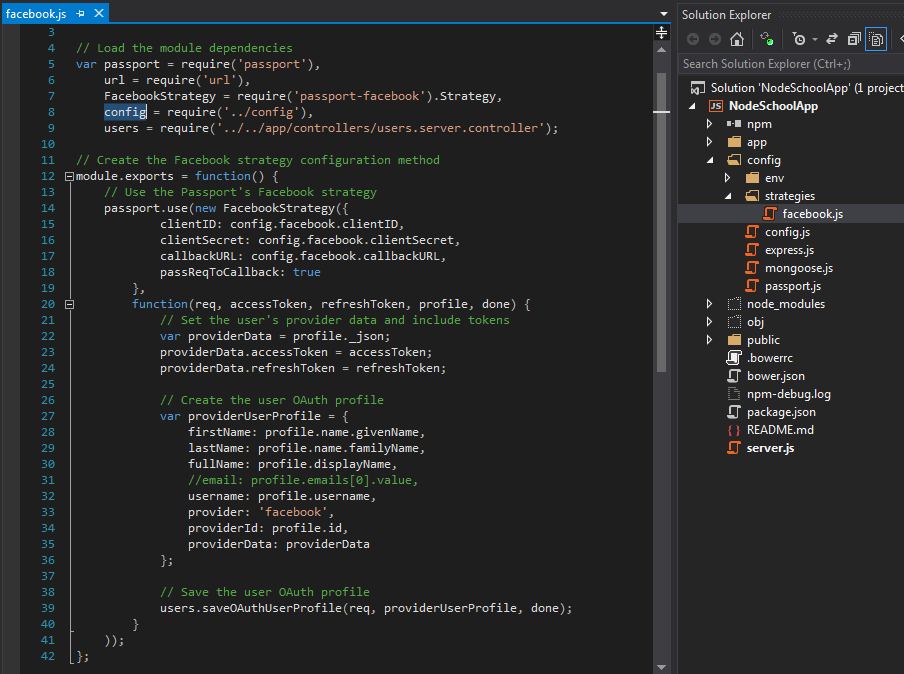
Now you have to configure passport-facebook middleware for the application. Add Facebook strategy configurations in to facebook.js file like below.
Add passport.js file like below.
Add passport instance for the application by modifying server.js file.
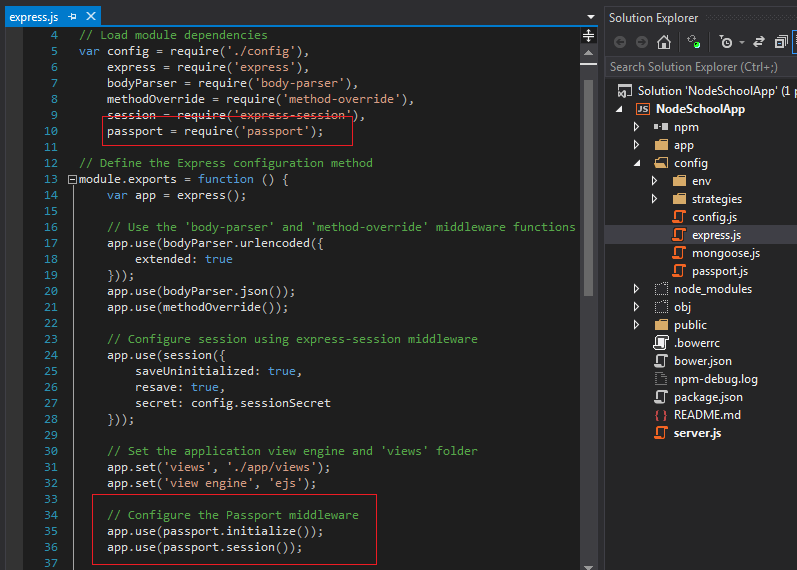
Configure express application for passport middleware.
For all above configurations you can read passport-facebook documentation. In the signin page , you will see "Sign in with Facebook" link. Using that you will be able to access the application and data will be saved into user table.
Showing posts with label AngularJS. Show all posts
Wednesday, June 3, 2015
Node Application with Session
Sessions allow you to keep user's data when they visit your application. This post will continue with the implementations done in my last post.
First you need to add express-session middleware.
The express-session module will use a cookie-stored, signed identifier to identify the current user. To sign the session identifier, it will use a secret string, which will help prevent malicious session tampering. Configure development.js file like below.
Now, configure your express application to use session middleware. The session middleware adds a session object to all request objects in your application. Using this session object, you can set or get any property that you wish to use in the current session.
In index.server.controller.js file add current date time into a session variable called, lastVisit.
Browse for http://localhost:3000/. In developer tools, session tab you will see a session cookie has added.
First you need to add express-session middleware.
The express-session module will use a cookie-stored, signed identifier to identify the current user. To sign the session identifier, it will use a secret string, which will help prevent malicious session tampering. Configure development.js file like below.
Now, configure your express application to use session middleware. The session middleware adds a session object to all request objects in your application. Using this session object, you can set or get any property that you wish to use in the current session.
In index.server.controller.js file add current date time into a session variable called, lastVisit.
Browse for http://localhost:3000/. In developer tools, session tab you will see a session cookie has added.
Tuesday, May 19, 2015
NodeJS with AngularJS
In my last post I showed how to create NodeJs application with MongoDb. In this post I will show how to add AngularJS functionality for the project.
First you should add Angular JS using bower. With that add AngularRouter and Angular Resource js files.
However, single page applications have one major problem. They are not indexable by search engines. To solve this issue, major search engines offer developers to mark their applications as single page applications. To mark your application routes as single-page application routes, you will need to use a routing scheme called Hashbangs. Hashbangs are implemented by adding an exclamation mark right after the hash sign, so an students URL would be http://localhost:3000/#!/students. Therefore, configure your main module for hashbang URL.
Add students folder into public folder. In that folder, create config, controllers, services an views folders.
AngularJS services are singleton entities that are usually used to share information between different entities of the same AngularJS application. AngularJS prebundled services and custom services. $http, $resource, $location, $q and $rootScope are commonly use services.
ngResource module provides easy way to communicate with a RESTful data source. In the above I have added angular resource module. And also I have added ngResource as dependency for our main module.
Then create a module for students folder.
Add student.client.service.js file into students/services folder. Content of that file should be like below.
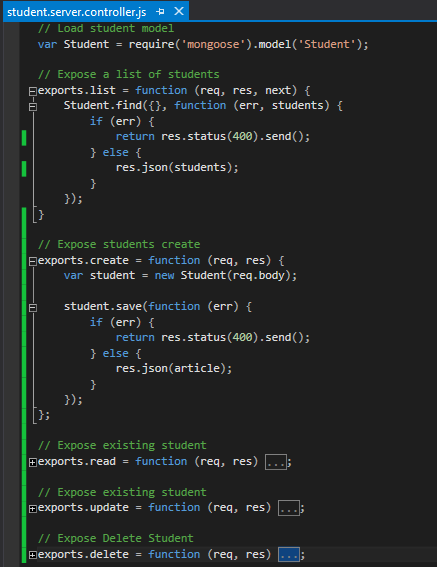
Now we have to change student.server.controller.js file for the CRUD operations.
Then we have to change student.server.route.js file.
Then add student module as a dependency to main module.
Next we need to create angular js module controller for students.
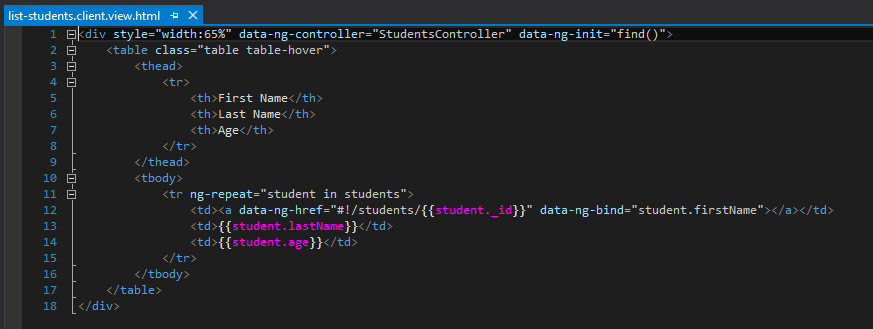
Next we need to implement angular js views.
Next we have to wire angular routes for the above.
Next we need to add index.server.controller.js and it's router file like below.
Then change index.ejs file content like below.
Run the application via Visual Studio. Then you will be able to see student list like below.
Then click on First Name. You will see student view.
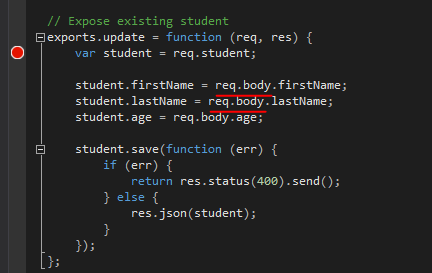
Then click edit link. You will see edit view. Then update name and save changes. This will give 500 error.
Reason for that is req.body undefined in student.server.controller.js.
You need to add body-parser and method-override npm packages.
The body-parser module provides several middleware to handle request data, and the method-override module provides DELETE and PUT HTTP verbs legacy support. To use these modules, you will need to modify your config/express.js file.
Then save function will work fine.
First you should add Angular JS using bower. With that add AngularRouter and Angular Resource js files.
However, single page applications have one major problem. They are not indexable by search engines. To solve this issue, major search engines offer developers to mark their applications as single page applications. To mark your application routes as single-page application routes, you will need to use a routing scheme called Hashbangs. Hashbangs are implemented by adding an exclamation mark right after the hash sign, so an students URL would be http://localhost:3000/#!/students. Therefore, configure your main module for hashbang URL.
Add students folder into public folder. In that folder, create config, controllers, services an views folders.
AngularJS services are singleton entities that are usually used to share information between different entities of the same AngularJS application. AngularJS prebundled services and custom services. $http, $resource, $location, $q and $rootScope are commonly use services.
ngResource module provides easy way to communicate with a RESTful data source. In the above I have added angular resource module. And also I have added ngResource as dependency for our main module.
Then create a module for students folder.
Now we have to change student.server.controller.js file for the CRUD operations.
Then we have to change student.server.route.js file.
Then add student module as a dependency to main module.
Next we need to create angular js module controller for students.
Next we need to implement angular js views.
Next we have to wire angular routes for the above.
Next we need to add index.server.controller.js and it's router file like below.
Then change index.ejs file content like below.
Run the application via Visual Studio. Then you will be able to see student list like below.
Then click edit link. You will see edit view. Then update name and save changes. This will give 500 error.
Reason for that is req.body undefined in student.server.controller.js.
You need to add body-parser and method-override npm packages.
The body-parser module provides several middleware to handle request data, and the method-override module provides DELETE and PUT HTTP verbs legacy support. To use these modules, you will need to modify your config/express.js file.
Then save function will work fine.
Saturday, April 18, 2015
Using Ionic with Apache Cordova
I wrote several blog posts(Apache Cordova with Angular JS, and Using a Cordova Plugin with Visual Studio) relates to Apache Cordova. In those applications, I used Bootstrap and FontAwesome for user interface designs. This is not wrong since we used Html 5 for hybrid mobile application development using Apache Cordova. However, we need to think again are those UI and icons are the best for a mobile specific application user interface.
Ionic is a framework, which mainly focused on look and feel of mobile applications.
In this post I will explain how to use Ionic for Html 5 hybrid application development. I'm using Visual Studio 2015 preview. I couldn't find any Visual Studio 2015 project templates for Ionic. Therefore, download Ionic from Github. For Visual Studio 2013 you could download Visual Studio Ionic Project Template.
First create a Blank Cordova Application like below.
Add Ionic files into framework folder.
Add Angular JS main module in to app folder.
Add welcomeView.html file like below. The content should write according to ion-view.
Modify index.html file like below. In here I used ion-nav-view which tracks user navigation history.
Run your application. You will see home screen like below.
Now it's time to modify the app for user friendly views. Add menu.html file and content should be like below. In here I used ion-side-menus directive.
Add another html page called, studentListView.html file. Content should be like below. This will show a list of students and I used item avatar css class from Ionic. I wrote a whole list of students. However you can use web api with angular repeat directive.
Modify, app.js file like below. In here I used angular js nested views.
Run your application, You will see a side menu with Home and Student List links.
For a mobile application it's better to have a footer with some icons. Therefore, modify index.html file and add ionic tabs like below.
You will see the footer of application like below.
Ionic is a framework, which mainly focused on look and feel of mobile applications.
In this post I will explain how to use Ionic for Html 5 hybrid application development. I'm using Visual Studio 2015 preview. I couldn't find any Visual Studio 2015 project templates for Ionic. Therefore, download Ionic from Github. For Visual Studio 2013 you could download Visual Studio Ionic Project Template.
First create a Blank Cordova Application like below.
Add Ionic files into framework folder.
Add Angular JS main module in to app folder.
Add welcomeView.html file like below. The content should write according to ion-view.
Modify index.html file like below. In here I used ion-nav-view which tracks user navigation history.
Run your application. You will see home screen like below.
Now it's time to modify the app for user friendly views. Add menu.html file and content should be like below. In here I used ion-side-menus directive.
Add another html page called, studentListView.html file. Content should be like below. This will show a list of students and I used item avatar css class from Ionic. I wrote a whole list of students. However you can use web api with angular repeat directive.
Modify, app.js file like below. In here I used angular js nested views.
Run your application, You will see a side menu with Home and Student List links.
For a mobile application it's better to have a footer with some icons. Therefore, modify index.html file and add ionic tabs like below.
You will see the footer of application like below.
Subscribe to:
Posts (Atom)