Showing posts with label NodeJS. Show all posts

Tuesday, May 28, 2019

Using DataLoader in GraphQL

In my previous post, we created a GraphQL API for student application. In this post, we are going to improve that API and add DataLoader functionality into GraphQL API.
In the API, you will get a following result for the below query. Therefore, we should do an improvement relates to fetching course registration query.
First, we will add merge.js file below. Then we should modify, courseRegistration.js file.
Now, you can query the API again like below and you will see the result.
However, the above implementation contains a huge performance issue. That is, there are situations, that we are fetching the same student and/or course record multiple times. As it is still a small API, you will not see a huge performance issue, but when the API becomes larger, these repetitive & costly database calls should not be there. Therefore, we are going to use DataLoader.
DataLoader will coalesce all individual loads which occur within a single frame of execution (a single tick of the event loop) and then call your batch function with all requested keys.
First, we should install the node module dependency. Then, we can change the merge.js file like below.
You can download the source code for this application from GitHub.

Monday, May 27, 2019

GraphQL with NodeJS

In this post, we are going to create a GraphQL API using NodeJS.
First, we will install the required node modules for the GraphQL API.
Then, we will create Student, Course and CourseRegistration models like below.
Next, we will focus on creating student functionality. In order to do that, we must define GraphQL schema for that. Create index.js file inside graphql/schema directory.
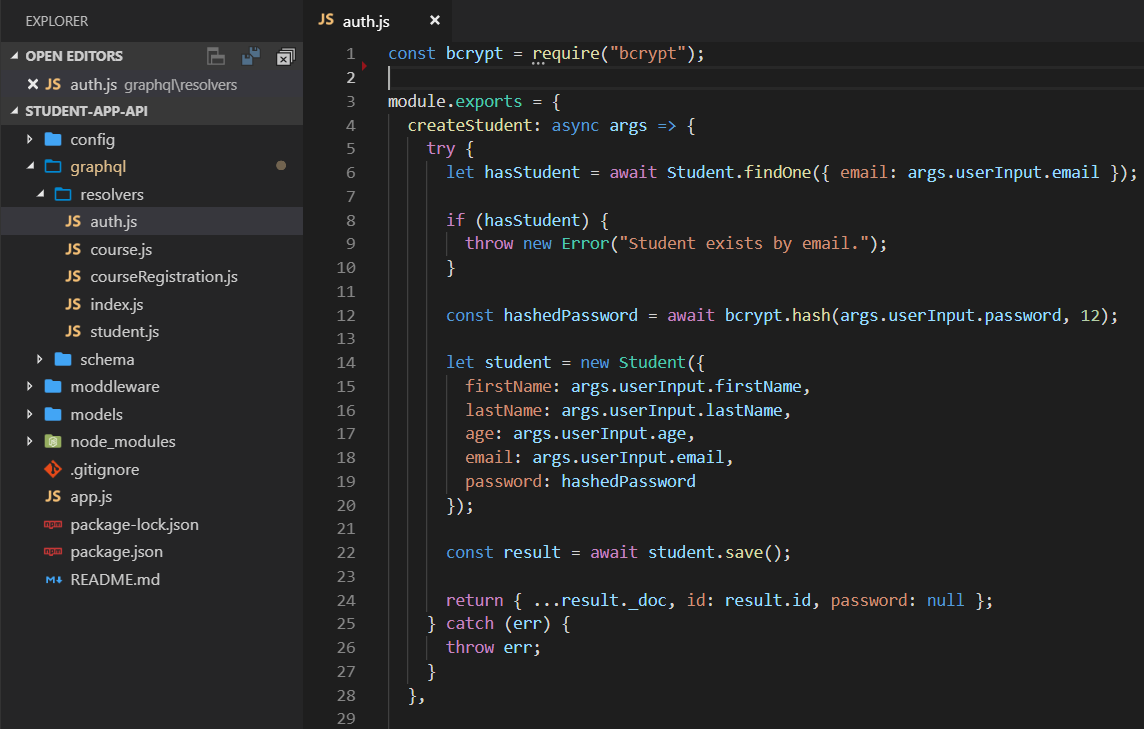
Then we will add a mapping resolver file to create student functionality. We call it auth.js and put it inside graphql/resolvers directory. When we create the student, we must encrypt the password. Therefore, we will use bcrypt node module for that.
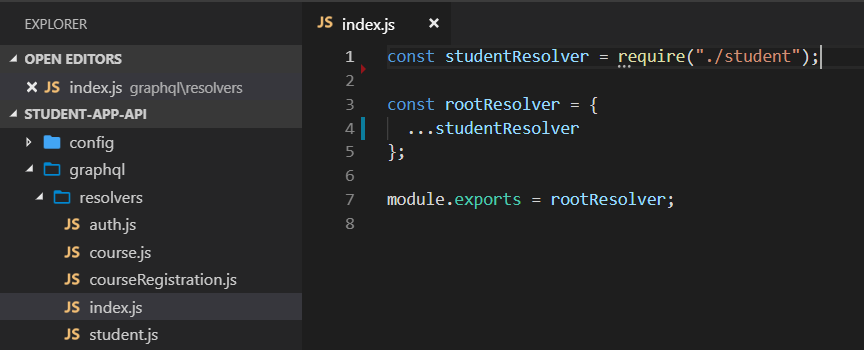
As we are going to have many resolvers, we can define a central resolver file like below.
Next, we need to start the NodeJS backend server like below.
As we have enabled, graphiql: true we can make open graphiql console and create a student like below.
In the above implementation, we created a GraphQL mutation functionality. Now we are going to create a query functionality using GraphQL.
First, we add a query for Courses. Then we implement functionality to fetch courses.
We can use graphiql interface to query courses.
Now, we have created basic functionality of a GraphQL API. As developers, we must know how to trigger GraphQL API endpoint using HTTP. I am using Advanced Rest Client tool like below.
After that, you will see the return result like below.
You can download the source code for this application from GitHub.

Friday, August 26, 2016

NodeJS Security Considerations

In my previous post I showed how to verify whether our installed node modules are out dated or not. New releases of modules will definitely have fixes for variety of issues. However, that is not enough as a developer. We need to verify whether there are vulnerable code anymore in our modules. Further we need to certify whole lot of dependency tree.
By using npm ls command we can view the dependency tree.
This will show a huge list. To have a graphical view of each module we can use http://npm.anvaka.com/.
In fact, we can not thoroughly look into each and every package for security issues. Therefore we will use a node package for that. Install retire npm package.
Then inside your node project run retire command like below. Then you will see list of vulnerabilities and their vulnerability level.
We can use Node Security Command line tools from https://github.com/nodesecurity/. nsp is the most commonly used module which use an API to check vulnerabilities. First install nsp as a global module.
Then run nsp check command while inside your project.
As a NodeJS developer, we should verify and remove for unused packages in our project. Easiest way is to use depcheck tool. First we need to install it.
Then we can run depcheck command inside our project.

Thursday, August 25, 2016

Useful npm Commands

When you work with npm modules it is always a best practice to install latest packages. Even this will reduce security vulnerabilities of outdated packages.
First I will show package.json file of my older project. In this project I haven't updated npm modules recently.
By running npm outdated command you can have a better idea about your outdated packages.

Tuesday, September 8, 2015

NodeJS Server Uptime

In NodeJS, everything is handled by a single javascript thread. So if an error get occurred, the server will stop.But this won't happen in traditional web servers. Because, in traditional web servers, there is a thread pool to handle requests. For each request, a thread will be assigned. If there is an error, that particular thread will discarded and new thread will be allocated.
In the following code, there are some invalid code.
In the first request, error get occurred and then server won't process any more requests.
Using forever we can automatically restart NodeJS server. First install forever like below.
Now, run above code using following command.
In the first client request server will crash. But forever will restart the server again. Forever is not a better way to handle errors in NodeJS application. But this is useful as a back for the unexpected.

Sunday, July 26, 2015

NodeJS API Authentication Using JWT

In my previous post I explained what is JWT and how to handle claim based authentication using that. In this post I will explain how to write simple NodeJS application using jwt-simple npm package.
First create blank nodejs application using visual studio like below.
Install following npm packages.
Create a folder called models and create User.js file like below.
In server.js file configure Access Token Headers like below.
Then write passport login function like below.
Next we need to write passport register function like below.
Next using jwt-simple npm packge, write following createSendToken function.
Next write register and login route functions like below.
We will create a new route called students and implement that like below.
Then set mongodb connection and listen for port 3000 in nodejs server like below.
Using Advanced Rest Client Chrome extension, we can test the application. First we will access students. Then we will get a unauthorized response.
Then register a user in the system like below. It will send a JWT token. Copy that to clip board. Because, to access students endpoint you need to send that token with headers.
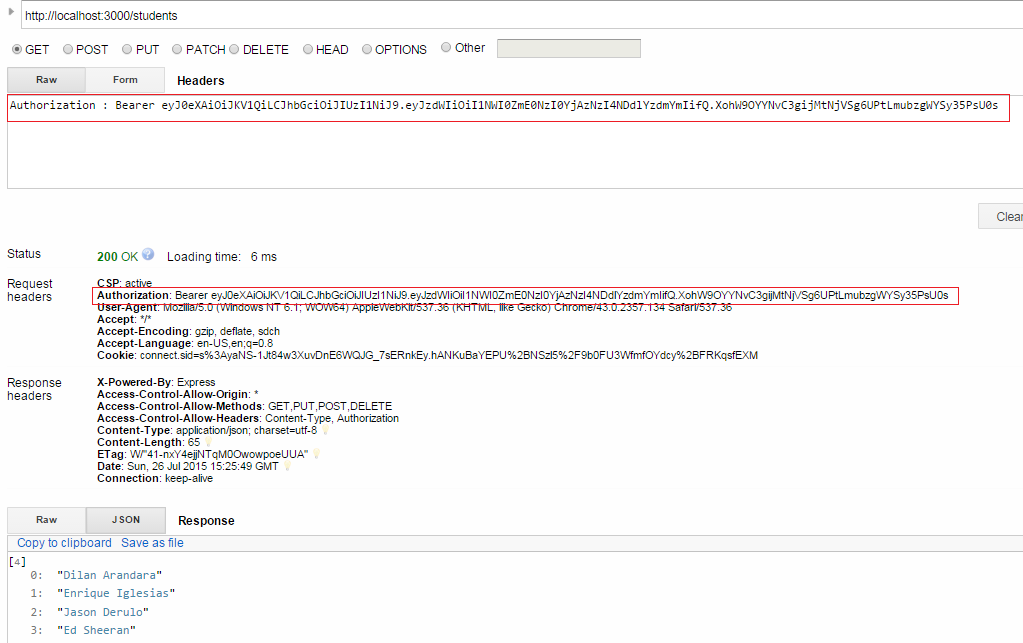
Next access students endpoint like below. Send the JWT token in headers like below.

What is JWT?

API based software development has hugely increased. Now we need to think how are we going to secure API based application. In my previous post I explained how to use token based authentication. In this post we will look how to use JSON web tokens and how to secure api based applications using that.
JSON web tokens(JWT - pronounced as jot), work across difference programming languages. A JWT can be separated into three parts by a dot (.).
  • Header
  • Payload
  • Signature

Header

Header contains, type and hashing algorithm.

Payload

Payload contains JWT claims. There are three claim types.

  • Registered claims
Claims that are not mandatory but whose names are registered for us. For example: The issuer of the token (iss), Subject of the token (sub), expiration of token (exp) and etc.
  • Public claims
These are claims defined by API owner. For example: Username and other important data.
  • Private claims
These are claims defined between producer and consumer of API.

Signature

The signature is made up of hash of following components.

  • Header
  • Payload
  • Secret (This value is held in server)

After that, in each request server needs to decode JWT and check payload claims.
According to claims, server can grant or deny functionalities.