Showing posts with label Knockout JS. Show all posts

Friday, April 5, 2013

JavaScript Unit Testing

Modern web applications use various java-script code to provide better interactivity and responsiveness. For example, java-script libraries like JQuery, KnockoutJS, DurandalJS, RequireJS and etc. So now we need to have proper environment for test java-script code. This will be a different challenge than server side testing.

In this demo I'll show how to test small java-script code which will calculate two input values. For testing, I'll use QUnit, which was written by JQuery team to test JQuery.

Create ASP.net MVC internet application. In HomeController add Demo Action and related view.
As you can see I have used HTML5 data bindings with KnockoutJS. Add calculate.js file with following scripts. If you are not familiar with KnockoutJS, you can read my previous posts.
When a user enter Number1, Number2 and press Add, then calculation will happen and total will be shown. Run this application and try it.
Now we have to test java-script code we wrote in calculate.js.

Download QUnit java-script file and QUnit style-sheet file from QUnit site. Add those files to Scripts and Content folders appropriately.
It's better to create tests separately. So we can add a new ASP.net MVC Area called Test.
Add DemoController and Index action and related view. In Index view add refrences for QUnit style sheet and QUnit java-script files. Also we need to add JQuery, Knockout and calcualte.js files, because calculate.js file requires those java-script libraries. Also add two div elements, which requires for QUnit. Give id for those div elements like below.
CalculateTest.js file is the java-script file which we wrote tests. Content of CalculateTest.js file is like below.
The test function and equal functions are specific to QUnit. In this file there's a test scenario called Calculate Test. Within that, I have created CalculateVM and set num1 and num2 appropriately, then call calculate function. After that, test whether total is correct or not. Run the application and go to /Test/Demo/. Result will be like below.
Now change expected value as 31.
Then result will have errors.
You can find the source of this demo in GitHub.

Monday, March 25, 2013

SPA with DurandalJS

DurandalJS is a client side java-script library which designed to make Single Page Applications(SPA). Durandal is built on jQuery, Knockout and RequireJS libs.

DurandalJS is using Asynchronous Module Definition (AMD) pattern by referring RequireJS. In my previous post I showed how to use RequireJS with ASP.net MVC.
In this post I'll explain how to create simple Single Page Application using DurandalJS.

First create ASP.net MVC internet application and install following NuGet packages.
  • Durandal
  • Durandal.Router
  • Durandal.Transitions
This will add some folders and required java-script files to the project. 
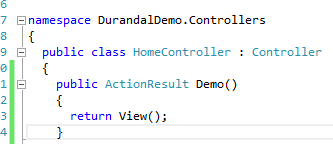
Now we need to create a view, for host the Single Page Application. So, add an Action for HomeController and related view page like below.
Add script references to view. Using data-main attribute, RequireJS will identify the location of Start up scripts. We must add a div container with an id of "applicationHost". That's the place Single Page Application going to be host.
Add views, viewmodels and main.js file in to App folder. 
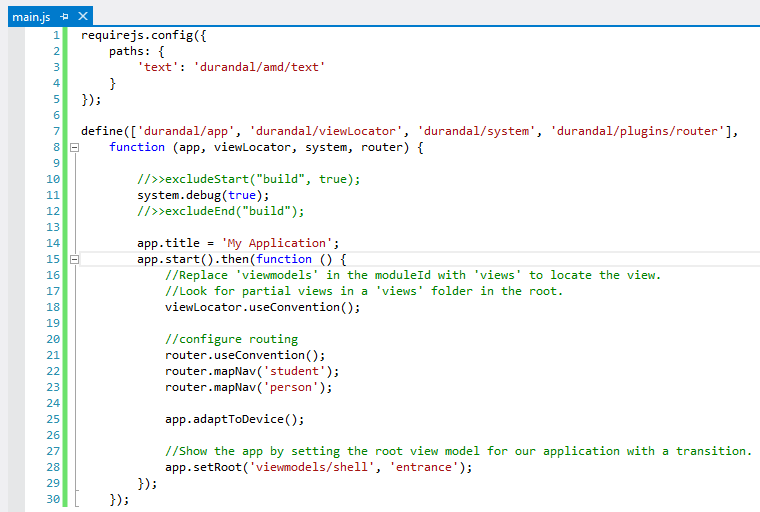
main.js file contains start-up scripts. So we can configure Durandal in there. Change main.js file like below.
We can enable debugging by using system.debug(true); This debug function is cross browser support and it only log details, when debug is enabled.
DurandalJS will start application by using app.start(). We can configure for application specific conventions like routing and also configure for mobile devices in this script. Finally set application root. You can see in our Single Page Application there are two views. Student and Person. So I have map those views using DurandalJS router.
Next we need to add shell.js, which is the root module that we configured in the main.js file. In shell module we activate student view. That means in start up of application student view will be default.
In DurandalJS for each view-model there must be relevant view file. So add shell.html. In root page, we have two links for student and person views. Next we need to bind each active view using KnockoutJS.
Now all the configurations parts are done. So add relevant view-models and views for Student and Person. After that, folder structure must be like below.
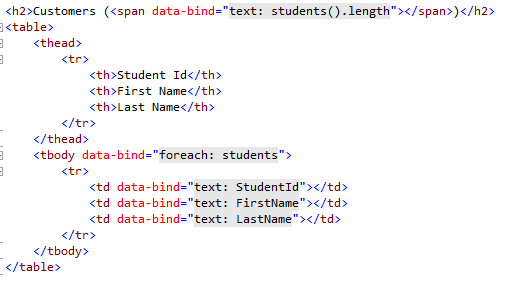
Content of each view and view-models should be like below. 
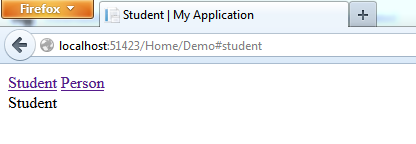
Run the application and browse /Home/Demo.
You can find the source of this demo in GitHub.

Monday, March 11, 2013

Consume Web API OData Service

In my previous post, I have explained about how to create an ASP.Net Web API OData service. In this post I'll explain how to consume that service using Breeze JS. This demo will continue with the project I have created in my previous post.

Install nuget packages for Breeze JS and Data JS.
In the HomeController add a new action method called Demo. After that add a view for that.
In that view, we need to add some java script references.
Now we have to write code for consume the ASP.Net Web API OData Service and bind those data to view. When we write object orient java scripts, we can add namespaces just like C#. In below code the namespace is myNameSpace.
Then we'll configure the breeze EntityManager. EntityManager is the gateway for the service and cached objects. Using the EntityManager we handles the asynchronous communication with services.
Now add a view model java script class which have a property called students and a function called load. This students is an array of student which stores students, retried from the service. This load function is use to load students from the service and add each student to the students array.
Now we have to call that load function and after that we have to enable students property, as a Knockout observable array.
Below is the full java script code that we wrote.
Now we have to design the view page. We are using Knockout bindings for that.
Now run the application and browse to /Home/Demo. You'll see the asynchronously loaded table.