Apache Cordova is a platform for building native mobile applications using HTML, CSS and JavaScript. In this post I will create a sample hybrid mobile application using
Cordova. This application will mainly use
Angular JS. I will use most of the codes from my previous
post.
You can easily install
Cordova using Visual Studio
plugins.
Create a
Blank Cordova Application.
Project structure looks like below. When Cordova starts, it will initiate to run
index.html file as the start up page. There you will find references of
cordova.js and
platformoverrides.js which are mainly used by
Cordova, when it package the application for different mobile specific packages.
And also,
index.js file is another important file which contains mobile application specific lifetime events.
Download
Jquery,
Bootstrap,
Angular,
Angular-resource,
Angular-router,
Angular-touch and
FontAwesome and then save
javascripts,
CSS and
fonts accordingly.
Add references of
javascripts and
css files into
index.html file.
Add
Angular main module in to
app folder like below.
As I have mentioned before, I copied several files from my previous
project which relates to previous post. Therefore, I won't explain much about the content.
welcomeView.html file is like below.
studentListViewController.js file content is like below.
studentListView.html file content should be like below.
studentDetailViewController.js file content should be like below.
studentDetailView.html file should like below.
commonService.js file content is like below.
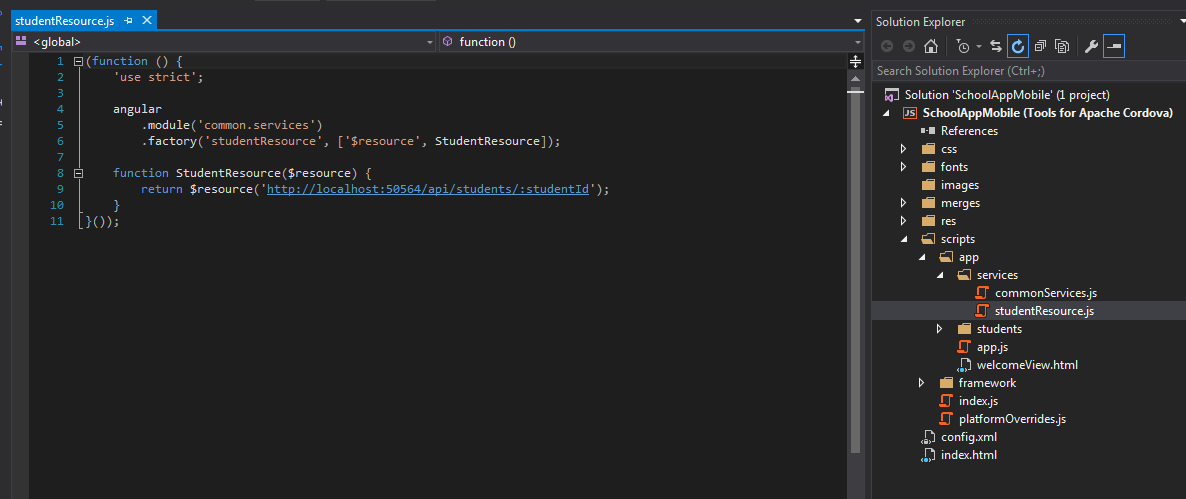
studentResource.js file should be like below.
Change
index.html file like below.
Then add application specific
javascript files.
Now run the application. Sometimes, Visual Studio get crashed(may be I'm using 2015 preview version). Therefore I think it is better if you enable
Detailed build output. To do that, go to
Tools -> Options and then select
Detailed according to following way.
You must run your
previous application which contains web api controllers. Reason for that is, you have specified a web api URL, in
studentResource.js file.
Following are the screens of
Home,
List and
Detail view.