Showing posts with label Go. Show all posts

Sunday, August 7, 2016

Integrate ReactJS Frontend with GoLang API

In my previous post we created todolist api using Gorilla web toolkit. In this post we will integrate that with the ReactJS TodoList application which we created earlier.
First will add TodoListAppContainer.js file.
Then change App.js file accordingly.
In TodoAppContainer.js file, will add constants for api url and headers for api endpoint.
In the componentDidMount lifecycle method, will do data fetching action. For data fetching, will use window.fetch function, which is easier and handle responses than using XMLHttpRequest. However, most of the browsers are not support this feature. Therefore will use whatwg-fetch node package. Install whatwg-fetch package and change TodoAppContainer.js file accordingly.
In browser you will see an output like below.
Next we need handle toggle event of checkbox. First we need to pass itemId and itemIndex values accordingly from TodoList.js file.
Now we need to update values accordingly within toggleItem function. However, when we work with array manipulations, we must remember in javascript arrays and objects are passed by reference. To make our life easier, ReactJS has provided a helper called update. We need to install react-addons-update node package. And also for Object manipulation we can use babel-polyfill node package. First we need to import above packages. Then will write toggleItem function.

Gorilla API Endpoint with MongoDB

I have already explained how to write API endpoint using Gorilla web toolkit. And also we have some experience of Go with MYSQL database. Today will write API endpoints with Gorilla and MongoDB as database.
First we need to download Golang MongoDB driver. MGo offers rich functionality as a MongoDB driver for Golang.
Then in MongoDB  will create a database called TodoList and add a collection called todolist.
In the project folder will add TodoList and TodoListItem structs.
Then add main.go file and configure routes accordingly.
TodoListGetAll function should be like below.
TodoListGetByOwner function should be like below.
TodoListUpdateItem function should be like below.
Then will format our code and build all go files. After than run the project.
Using browser access http://localhost:3000/api/todolist/. You will see an output like below.

Thursday, June 9, 2016

Test Coverage In Go

In my previous post I showed how to write basic tests in Golang. In this post we will go through how to identify test coverage in Golang with it's inbuilt commands. I will continue with the source code from previous post.
First run following command. Output is about basic details of test coverage in our current code base.
Next add new function like below.
Again run command for test coverage. This time output is different.
If you need to get function wise output, then we need to run following command.
Further if you need to export those data into html, you can use following command. It will output the details into your default web browser.
The output is like below.

Testing in Golang

Golang is one of the programming language which use convention over configuration. In Go application, we can write a test file by adding Test suffix to test source file. Then this file will be ignored in Go build process. And also test runner can inspect test functions in these files and execute tests.
There are three types of tests in Go.

  • Basic Tests (Regular tests)
Basic tests are for identify application is performing accurately. These tests required to have Test prefix in test functions.
  • Benchmark Tests

Benchmark test are for identify performance with related to limits. These tests required to have Benchmark prefix in functions.

  • Example Tests
Example tests are integrated with GoDoc tool. These test required to have Example as prefix.
In this post, we will create a Basic test. We are going to do Test Driven Development, therefore we need to first write test functions.
Then write the actual code.
Now using following command we can run test runner. The output will be like below.
Next will change result comparing value for demonstration purpose. Then our test function become incorrect.
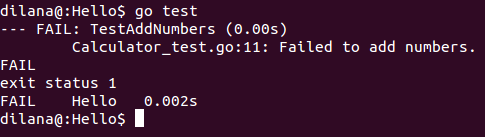
Run go test command again. Then output is like below.

Saturday, June 4, 2016

OAuth2 with Golang

In my previous post I showed how to have an authentication handler. In this post I will continue with that source and implement user login using OAuth2. I will use Google as the provider.
Gomniauth is a better solution as GoLang OAuth2 package. First we need to install Gomniauth package.
In this demo we will use Google as the authentication provider. Using Google Developer Console you can create a client id and client secrets. And also you have to give host URL and re directional URL. Then will setup Gomniauth in main.go file.
Next will add login.html file.
Add endpoint for login.html in main function.
In login.html Google login link is given as "/auth/login/google". We need to write a login handler which can identify the provider and redirect request accordingly. Because in future we can add more providers like Facebook, Github and etc.
Next we need to write callback handler. In callback, we can retrieve user's basic data using Gomniauth functions. Once we have response data, we Base64 encode full name and save it into a cookie called auth cookie. Then we can retrieve those details later from the cookie and show it in our web pages.
Update templateHandler function like below.
Update home.html file to show name retrieved from Google login.

Friday, June 3, 2016

Authentication Wrapper Handler Using Go

In this post I will show how to secure your routes by wrapping http handler.
First add main.go file with following content.
Add a folder called templates and add home.html file with following contents.
Then build and run the application.
Output should be displayed like below.
Now we need to restrict access for /home route if "auth" cookie is not present. Add auth.go file which will contains all the authentication related functionalities.
Now we need to change the main function accordingly.
Build and run the application. You will see 404 page like below.

Monday, May 30, 2016

API endpoint using Gorilla

In my previous post I explained how to insert and view data from mysql database using golang. In this post I will explain how to access data from API endpoint. I will use Gorilla Web Framework for this.
First we need to install Gorilla mux routing package.
Then we need to create a struct for JSON response.
Next will write Http Request Handler function.
Next will integrate it with Gorilla Mux URL routing framework. Using regular expressions we have create the StudentByIdHandler.
You can access the student response like below.

Sunday, April 24, 2016

GO with MYSQL

GO's default SQL package is database/sql, and it allows more generalized database connectivity. In this post, I'm going to use third party mysql driver called Go-MySQL-Driver. You can install it using following command.
Then we need to create a database schema for this. I'll use student table schema like below.
Create GO project using Eclipse. Then add Student struct like below.
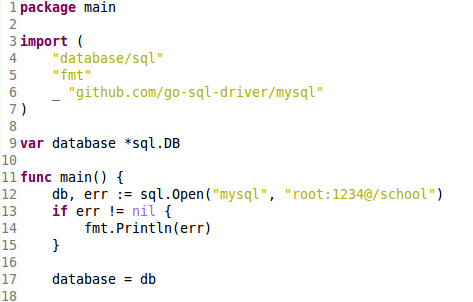
Then we need to import required packages.
And also in the main function I have connected to my mysql database. In the connection string you have to give mysql database, username and password appropriately.
Following image show how to write the CreateStudent function.
Next I have wrote GetStudent function.
You can invoke above functions from the main function like below.