Showing posts with label GitHub. Show all posts

Friday, April 5, 2013

JavaScript Unit Testing

Modern web applications use various java-script code to provide better interactivity and responsiveness. For example, java-script libraries like JQuery, KnockoutJS, DurandalJS, RequireJS and etc. So now we need to have proper environment for test java-script code. This will be a different challenge than server side testing.

In this demo I'll show how to test small java-script code which will calculate two input values. For testing, I'll use QUnit, which was written by JQuery team to test JQuery.

Create ASP.net MVC internet application. In HomeController add Demo Action and related view.
As you can see I have used HTML5 data bindings with KnockoutJS. Add calculate.js file with following scripts. If you are not familiar with KnockoutJS, you can read my previous posts.
When a user enter Number1, Number2 and press Add, then calculation will happen and total will be shown. Run this application and try it.
Now we have to test java-script code we wrote in calculate.js.

Download QUnit java-script file and QUnit style-sheet file from QUnit site. Add those files to Scripts and Content folders appropriately.
It's better to create tests separately. So we can add a new ASP.net MVC Area called Test.
Add DemoController and Index action and related view. In Index view add refrences for QUnit style sheet and QUnit java-script files. Also we need to add JQuery, Knockout and calcualte.js files, because calculate.js file requires those java-script libraries. Also add two div elements, which requires for QUnit. Give id for those div elements like below.
CalculateTest.js file is the java-script file which we wrote tests. Content of CalculateTest.js file is like below.
The test function and equal functions are specific to QUnit. In this file there's a test scenario called Calculate Test. Within that, I have created CalculateVM and set num1 and num2 appropriately, then call calculate function. After that, test whether total is correct or not. Run the application and go to /Test/Demo/. Result will be like below.
Now change expected value as 31.
Then result will have errors.
You can find the source of this demo in GitHub.

Friday, March 22, 2013

Modular Java Scripts with RequireJS

RequireJS is a java script module loader library. Using a modular script loader like RequireJS, will improve speed and quality of the code.

Why need web modules?

  • Web sites are turning into Web apps
  • Code complexity grows as the site gets bigger
  • Assembly gets harder
  • Developer wants discrete JS files/modules
  • Deployment wants optimized code in just one or a few HTTP calls

RequireJS Demo


In this demo I'll use ASP.net MVC internet project. Add RequireJS nuget package to the project.
Add a Web Api controller named CallerController with a method like below.
Now we have to design the view. So add an Action method to HomeController.
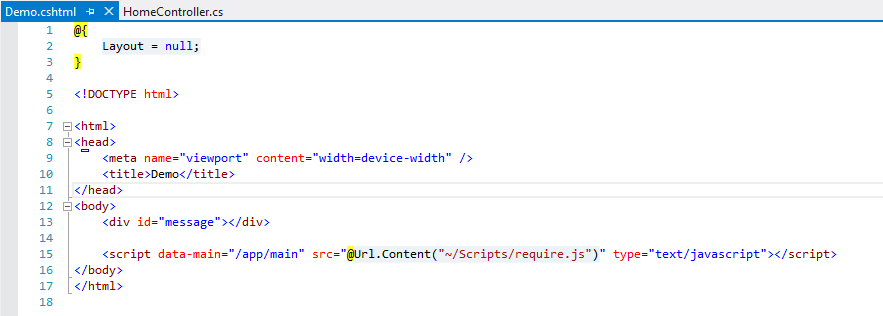
 Add a view called Demo.chtml.
In Demo.chtml, I have added a div element which has id of message. When Demo page loads, a java-script will call CallerController and response will show in this div. Before close body tag, I have referenced the RequireJS. This is a best practice of referring java-script files. Reason is when the page loads, java-script file will request after DOM elements loaded. In script reference there's a new attribute called data-main, which tells RequireJS to load start up scripts.
Now we have to develop the middle part of view and service.
Create java-script file for call the service.
In this file, define('dataservice') is name of the module. In next argument we can pass dependency modules. In the function call as arguments we are passing references for each dependency modules.
Now create config, caller and main modules like below.
In main module we need to configure RequireJS. I have passed path for 'jquery' module. Define start up code. In the function call showMessage method in caller java-script file. So that's all the things we have to do.
Run the application and go to /Home/Demo. You'll see below page.
So now, the application is working properly. But the app folder, which contains java-scripts files are look like this.
So we can structure it more appropriate way like below.
That change affects for the paths of each java-script module. We must configure java-script module paths in RequireJS like below.
I added this source to GitHub. You can have a look on this demo.