Sessions allow you to keep user's data when they visit your application. This post will continue with the implementations done in my last post.
First you need to add express-session middleware.
The express-session module will use a cookie-stored, signed identifier to identify the current user. To sign the session identifier, it will use a secret string, which will help prevent malicious session tampering. Configure development.js file like below.
Now, configure your express application to use session middleware. The session middleware adds a session object to all request objects in your application. Using this session object, you can set or get any property that you wish to use in the current session.
In index.server.controller.js file add current date time into a session variable called, lastVisit.
Browse for http://localhost:3000/. In developer tools, session tab you will see a session cookie has added.
Wednesday, June 3, 2015
Tuesday, May 19, 2015
NodeJS with AngularJS
In my last post I showed how to create NodeJs application with MongoDb. In this post I will show how to add AngularJS functionality for the project.
First you should add Angular JS using bower. With that add AngularRouter and Angular Resource js files.
However, single page applications have one major problem. They are not indexable by search engines. To solve this issue, major search engines offer developers to mark their applications as single page applications. To mark your application routes as single-page application routes, you will need to use a routing scheme called Hashbangs. Hashbangs are implemented by adding an exclamation mark right after the hash sign, so an students URL would be http://localhost:3000/#!/students. Therefore, configure your main module for hashbang URL.
Add students folder into public folder. In that folder, create config, controllers, services an views folders.
AngularJS services are singleton entities that are usually used to share information between different entities of the same AngularJS application. AngularJS prebundled services and custom services. $http, $resource, $location, $q and $rootScope are commonly use services.
ngResource module provides easy way to communicate with a RESTful data source. In the above I have added angular resource module. And also I have added ngResource as dependency for our main module.
Then create a module for students folder.
Add student.client.service.js file into students/services folder. Content of that file should be like below.
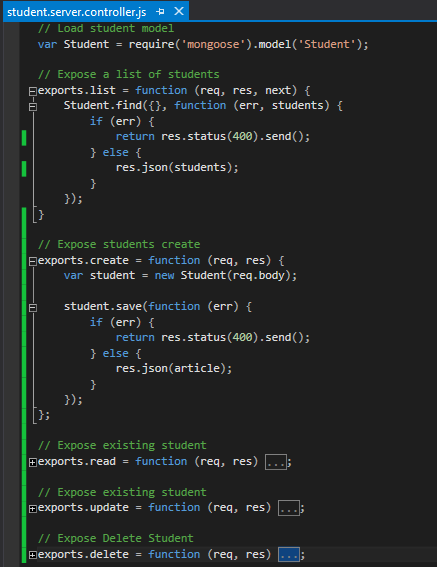
Now we have to change student.server.controller.js file for the CRUD operations.
Then we have to change student.server.route.js file.
Then add student module as a dependency to main module.
Next we need to create angular js module controller for students.
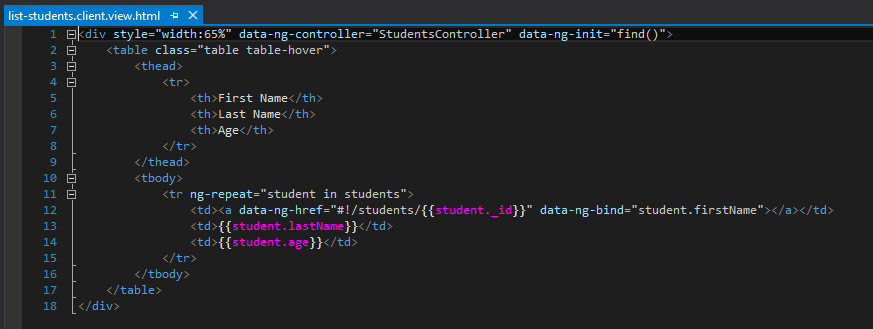
Next we need to implement angular js views.
Next we have to wire angular routes for the above.
Next we need to add index.server.controller.js and it's router file like below.
Then change index.ejs file content like below.
Run the application via Visual Studio. Then you will be able to see student list like below.
Then click on First Name. You will see student view.
Then click edit link. You will see edit view. Then update name and save changes. This will give 500 error.
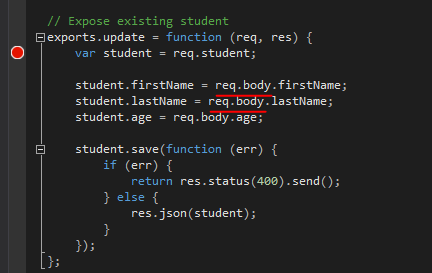
Reason for that is req.body undefined in student.server.controller.js.
You need to add body-parser and method-override npm packages.
The body-parser module provides several middleware to handle request data, and the method-override module provides DELETE and PUT HTTP verbs legacy support. To use these modules, you will need to modify your config/express.js file.
Then save function will work fine.
First you should add Angular JS using bower. With that add AngularRouter and Angular Resource js files.
However, single page applications have one major problem. They are not indexable by search engines. To solve this issue, major search engines offer developers to mark their applications as single page applications. To mark your application routes as single-page application routes, you will need to use a routing scheme called Hashbangs. Hashbangs are implemented by adding an exclamation mark right after the hash sign, so an students URL would be http://localhost:3000/#!/students. Therefore, configure your main module for hashbang URL.
Add students folder into public folder. In that folder, create config, controllers, services an views folders.
AngularJS services are singleton entities that are usually used to share information between different entities of the same AngularJS application. AngularJS prebundled services and custom services. $http, $resource, $location, $q and $rootScope are commonly use services.
ngResource module provides easy way to communicate with a RESTful data source. In the above I have added angular resource module. And also I have added ngResource as dependency for our main module.
Then create a module for students folder.
Now we have to change student.server.controller.js file for the CRUD operations.
Then we have to change student.server.route.js file.
Then add student module as a dependency to main module.
Next we need to create angular js module controller for students.
Next we need to implement angular js views.
Next we have to wire angular routes for the above.
Next we need to add index.server.controller.js and it's router file like below.
Then change index.ejs file content like below.
Run the application via Visual Studio. Then you will be able to see student list like below.
Then click edit link. You will see edit view. Then update name and save changes. This will give 500 error.
Reason for that is req.body undefined in student.server.controller.js.
You need to add body-parser and method-override npm packages.
The body-parser module provides several middleware to handle request data, and the method-override module provides DELETE and PUT HTTP verbs legacy support. To use these modules, you will need to modify your config/express.js file.
Then save function will work fine.
NodeJs with MongoDB
In my last post I showed how to write a NodeJS application using EJS view engine. In this post I will explain how to integrate NodeJS application with MongoDB.
First we need to install Mongoose module.
It is better if we save the mongodb connection in a environment specific file. Create a new folder called env in config folder and add development.js file into that. The content of that file should be like below.
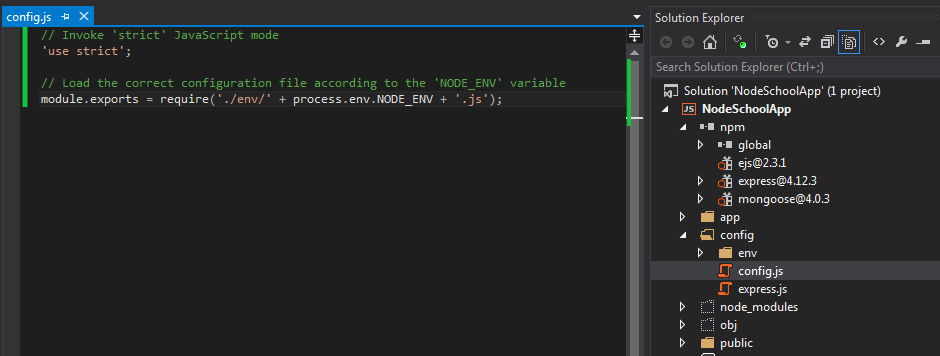
Now add a configuration file into config folder like below. Depending on the Node environment, the config file will load appropriate node environment file.
Add a file called mongoose.js into config folder, which contains mongodb related configurations.
Now we have to initialize mongoose configuration in server.js file. Notice, I have added environmental configurations in server.js file.
Then create student schema in app/model folder. In here first you will define your StudentSchema using Schema constructor. Then you will add Student model using StudentSchema instance.
First you must register the Student model in mongoose.js file like below.
Make sure, mongose configuration file is loaded before any other configuration file is loaded.
Change controller functionality accordingly.
Browse http://localhost:3000/ location. You will see results like below.
First we need to install Mongoose module.
It is better if we save the mongodb connection in a environment specific file. Create a new folder called env in config folder and add development.js file into that. The content of that file should be like below.
Now add a configuration file into config folder like below. Depending on the Node environment, the config file will load appropriate node environment file.
Add a file called mongoose.js into config folder, which contains mongodb related configurations.
Now we have to initialize mongoose configuration in server.js file. Notice, I have added environmental configurations in server.js file.
Then create student schema in app/model folder. In here first you will define your StudentSchema using Schema constructor. Then you will add Student model using StudentSchema instance.
First you must register the Student model in mongoose.js file like below.
Make sure, mongose configuration file is loaded before any other configuration file is loaded.
Change controller functionality accordingly.
Browse http://localhost:3000/ location. You will see results like below.
Subscribe to:
Posts (Atom)