Showing posts with label OData. Show all posts

Monday, March 11, 2013

Consume Web API OData Service

In my previous post, I have explained about how to create an ASP.Net Web API OData service. In this post I'll explain how to consume that service using Breeze JS. This demo will continue with the project I have created in my previous post.

Install nuget packages for Breeze JS and Data JS.
In the HomeController add a new action method called Demo. After that add a view for that.
In that view, we need to add some java script references.
Now we have to write code for consume the ASP.Net Web API OData Service and bind those data to view. When we write object orient java scripts, we can add namespaces just like C#. In below code the namespace is myNameSpace.
Then we'll configure the breeze EntityManager. EntityManager is the gateway for the service and cached objects. Using the EntityManager we handles the asynchronous communication with services.
Now add a view model java script class which have a property called students and a function called load. This students is an array of student which stores students, retried from the service. This load function is use to load students from the service and add each student to the students array.
Now we have to call that load function and after that we have to enable students property, as a Knockout observable array.
Below is the full java script code that we wrote.
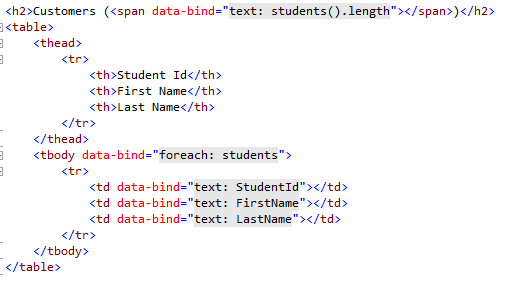
Now we have to design the view page. We are using Knockout bindings for that.
Now run the application and browse to /Home/Demo. You'll see the asynchronously loaded table.

Friday, February 22, 2013

Self hosted ASP.Net Web API OData service

In my previous post I showed how to create ASP.Net Web API OData application. In this post I'll show, how to host an ASP.Net Web API OData service in a console application.

First create a console application using .net 4.5. Add two nuget packages, which are

  • Microsoft.AspNet.WebApi.Selfhost
  • Microsoft.AspNet.WebApi.OData
Create a new model class called Student.
Also create StudentFacade class like below. 
First we have to write our EDM model. To do that add a new method to Program class like below. 
Using ODataConventionModelBuilder, we define which entity sets that should be exposed to the out side world. 
Now we have to configure our OData route.  MapODataRoute is an extension method. We have to add using staement for System.Web.Http.OData. Since we are going to do a self hosted service, we have to use HttpSelfHostConfiguration class for the OData configuration.
Now we have to create a sever and host the service in there.
Below is the Program class up to now.
Now run the application and go to http://localhost:53543/odata/ using browser. You can see the service document for this particular service. 
To view other metadata of the service, access the http://localhost:53543/odata/$metadata URL. 
Now we need to access Student data set. Go to  http://localhost:53543/odata/student URL. But you'll get 404 message.
Reason is though you have exposed the entity sets, there must be an ODataController to expose data from entity sets.
We have to define an ODataController like below.
Run the program again and go to  http://localhost:53543/odata/student URL. You'll see a list of students.

Thursday, February 21, 2013

OData using ASP.Net Web API

OData is a data access protocol in the web. This OData protocol supports for both XML and JSON formats.

In this post I'll explain how to create an OData end point using ASP.Net web API.

Create ASP.net mvc application using .net 4.5. Install Microsoft.AspNet.WebApi.OData nuget package.
Create a model class called Student.
Build the solution and add StudentController to the project. Add code like below.
Open App_Start folder and edit WebApiConfig.cs file to configure the OData end points. Add the following code.
ODataConventionModelBuilder needs to know the collections that we need to expose to the outside world. So we are configuring that in here.
In above code "Student" is name of the entityset. Name of the controller must match the name of the entityset. Particular end point can have multiple entity sets.
The first parameter is the route name. The second parameter is the URI prefix for the endpoint. Then for the Student entityset the URI is http:/hostname/odata/Student. For an application there can be more than one OData endpoint. After we run the code, the results would be look like below.

Pagination using OData Web API

Using OData Web API, we can have server driven paging. The only thing that we have to do is pass PageSize argument for QueryableAttribute.
After that the results will be look like below.
In JSON result there's a new thing called odata.nextLink. Using that we can fetch the next page.