Sunday, July 26, 2015

What is JWT?

API based software development has hugely increased. Now we need to think how are we going to secure API based application. In my previous post I explained how to use token based authentication. In this post we will look how to use JSON web tokens and how to secure api based applications using that.
JSON web tokens(JWT - pronounced as jot), work across difference programming languages. A JWT can be separated into three parts by a dot (.).
  • Header
  • Payload
  • Signature

Header

Header contains, type and hashing algorithm.

Payload

Payload contains JWT claims. There are three claim types.

  • Registered claims
Claims that are not mandatory but whose names are registered for us. For example: The issuer of the token (iss), Subject of the token (sub), expiration of token (exp) and etc.
  • Public claims
These are claims defined by API owner. For example: Username and other important data.
  • Private claims
These are claims defined between producer and consumer of API.

Signature

The signature is made up of hash of following components.

  • Header
  • Payload
  • Secret (This value is held in server)

After that, in each request server needs to decode JWT and check payload claims.
According to claims, server can grant or deny functionalities.

Token Based Authentication

Reasons for token based authentication :
  • Stateless and salable servers
  • Mobile applications
  • Pass authentication to other applications (OAuth)
  • Extra Security
HTTP is a stateless protocol. Though we authenticate a user, application wont know about that user in next request. Traditional way is to store session data in the server. Usually in memory or stored in a disk. But this approach introduced lots of issues.
  • Server need to store session data (Overhead)
  • Session is store in the server. So issues come up when scaling the server
  • Mobile applications need to have CORS.
Steps of Token Based Authentication
  • User Requests Access with Username / Password
  • Application validates credentials
  • Application provides a signed token to the client
  • Client stores that token and sends it along with every request
  • Server verifies token and responds with data

Tuesday, July 21, 2015

Getting Started With Meteor.js

Meteor JS is a Full Stack javascript library which contain front-end libraries and NodeJS based server. Meteor allows us to build a web application quickly.You can follow the steps in MeteorJS site for install meteor into your machine.
In this post I will go through default meteor application.
First create a new meteor application called MyDemoApp.
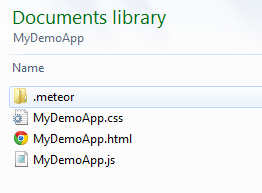
Default file structure would look like below.
Using meteor command start the application.
Using Chrome developer tools you will be able to see source code.
But remember, this code is the source code after javascript code is executed. So, to view initial source code, right click on page and select View Page Source.
In here, you will see an empty body tag. Reason for that is, meteor engine will see the body tag as a meteor template. So, that template will inject when the DOM get loaded. In source code, there are lots of javascript flies are linked. Those are files from meteor core packages. And also it will contains third-party libraries.
In production release, all the files get minified in to one file like below.