Thursday, March 26, 2015

Using Web API in ASP.net 5

In my last post I created a Web Project using ASP.net 5. Now we will create some web api controllers.
First, add ASP.net MVC nuget package to the project.
Then change the Startup.cs class like below.
When you run the application, the browser must open following page, which means your IIS works correctly.
In ASP.net 5, there are two primary concepts.

  • Middleware
Middleware is in the HTTP pipeline. When HTTP request comes in it will go through all the middleware according to the order they have defined. After complete that request, response with flows back through the same route.
  • Services
Using dependency injection pattern, services are availabled to all middleware components. For example, DbContext, Logger service and etc.

Change the Startup class like below. Above mentioned middleware and Service codes are applied from Startup class. This code has configured to use DbContext using DI pattern.
Create folder named Controllers and add a Web API Controller class like below.
If you have data in your database, then you will be able to see an output like below.
Assume, there was an exception occurred. Change the web api controller code like below.
Change the Startup.cs file content.
When you run the project, you will see a beautiful error handling page which contains lots of details.

Using Entity Framework 7

In this post I'm going to demonstrate about how to use Entity Framework 7 in MVC 6 project. I will use Visual Studio 2015 CTP version.
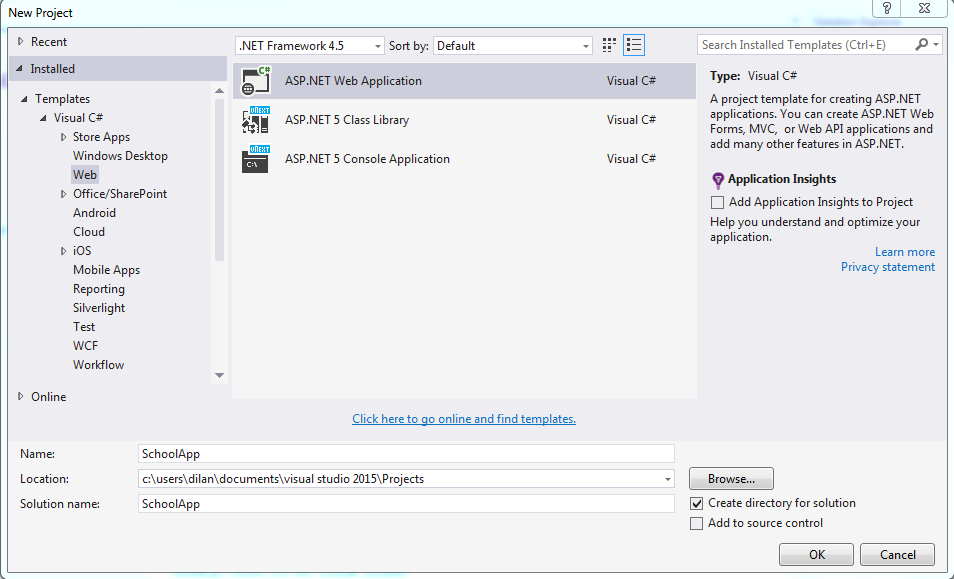
First create a New Project like below.
I want to build my project from scratch. Therefore create an Empty ASP.net 5 preview project.
There are some visible structural changes in the MVC project. There's a file called Startup.cs, where you can configure your HTTP request pipeline. wwwroot is the web root, where you can put all your static files.
In the references folder, there are two target frameworks which has defined in project.json file.

We need to add references for EntityFramework as nuget packages like below.

Create a folder called Model. Inside that create Student.cs class like below.
Next we need to add DbContext file for this SchoolApp.
Then we need to add EntityFramework migration files. So, open Package Manager Console, and go to SchoolApp folder where the project.json file exists.
We have to execute the following command to add initial migration.
This will give an error due to inability to load the command. Add following command to project.json file.
After the above step, execute following commands.
This will add migration files and also create the database.


Thursday, November 20, 2014

Create C# classes using a JSON response

Assume you have a JSON access point and the response is like below(This is accessed via Fiddler).
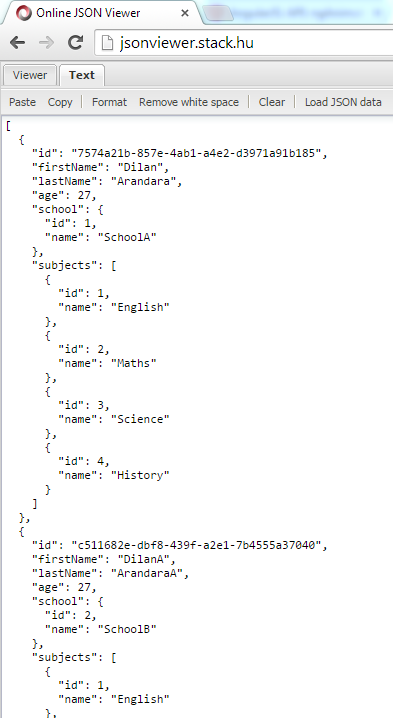
Copy that JSON response and format it using a JSON viewer. In this demo I have used http://jsonviewer.stack.hu/.
Copy the code snippet as highlighted.
Create an empty class file in Visual Studio.
The you can paste the JSON code as classes like below.
The created classes will be look like below.